Embroidery Basics
DST vs PES: What's the Difference Between These Embroidery Files?
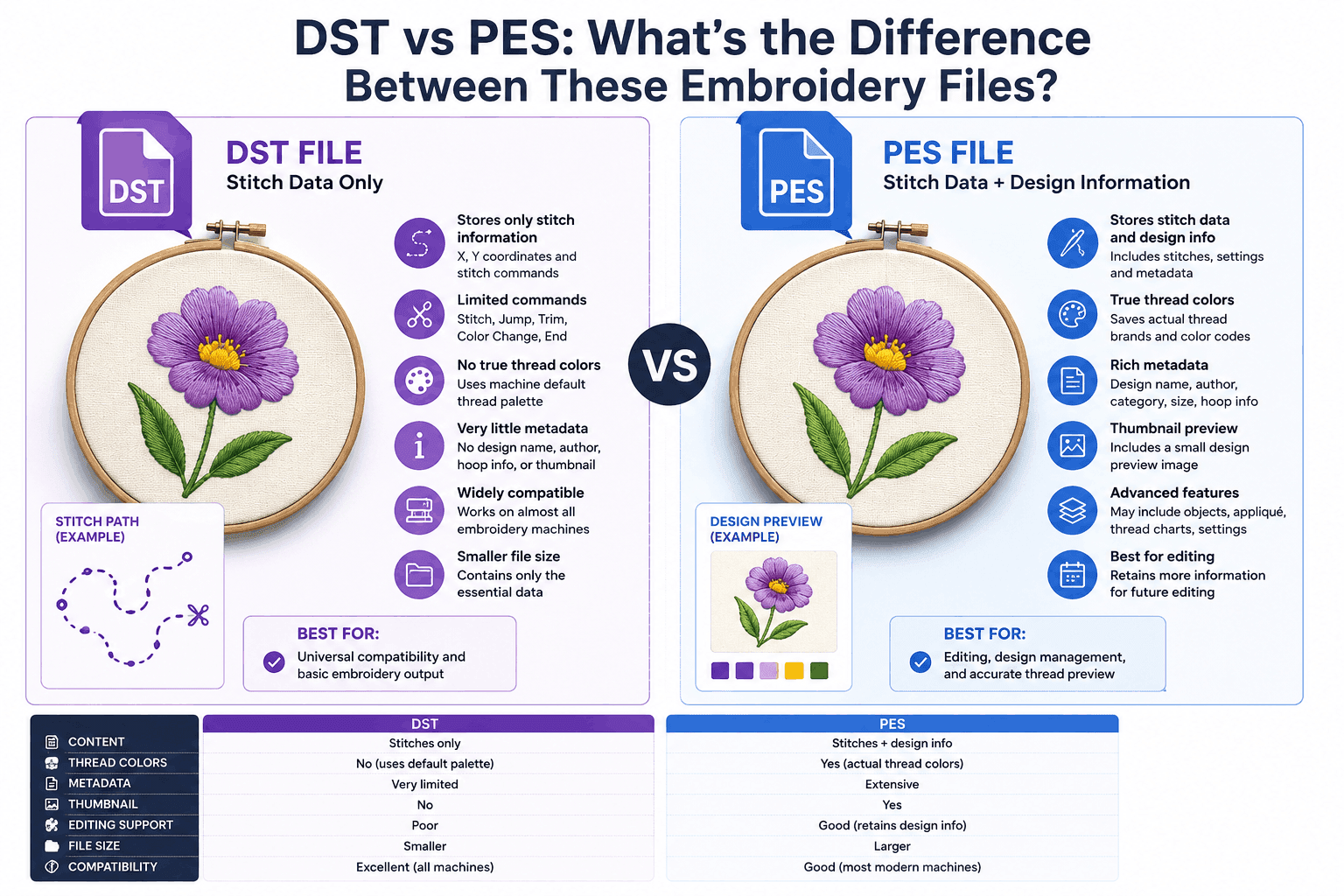
DST and PES are the two embroidery file formats you'll run into most often — and beginners constantly mix them up. They both tell an embroidery machine how to sew a design, but they were created by different companies, store different information, and work best on different machines.
In this guide we'll break down the difference between DST and PES files in plain language: what each format stores, which machines read them, when to use one over the other, and how to convert and view both online.
DST vs PES: The Quick Answer
If you only remember one thing, remember this: a DST file stores stitches but not colors and works on almost any machine, while a PES file stores stitches and thread colors and is made for Brother and Babylock machines.
DST is the universal production format of the commercial embroidery world. PES is the consumer and semi-professional format that keeps your colorway intact.
What Is a DST File?
DST stands for Data Stitch Tajima. It was developed by Tajima, one of the world's leading commercial embroidery machine manufacturers, and has become the de facto industry standard.
A DST file stores:
- Stitch coordinates (the sewing path)
- Jump stitches
- Trim commands
- Color-change stops (but not the colors themselves)
- Design boundaries
Crucially, DST does not store thread colors. It only marks where a color change happens; the machine operator decides which thread goes on each needle. That keeps the format tiny and universally compatible. Learn more in our guide on what a DST file is.
What Is a PES File?
PES is the native embroidery format for Brother and Babylock machines. A PES file is really a wrapper: it contains an embedded PEC block that holds the actual stitch data, plus extra information the home-embroidery ecosystem relies on.
A PES file stores:
- Stitch coordinates, jumps and trims
- The design's thread colors (the colorway)
- Thread brand and color references
- A small preview/thumbnail of the design
- Format version and hoop information
Because PES carries the colorway, a design opens in its intended colors instead of a single default thread — a big convenience for hobbyists and small shops working on Brother or Babylock hardware.
Key Differences Between DST and PES
Here is a side-by-side comparison of the two embroidery formats:
| Feature | DST | PES |
|---|---|---|
| Full name | Data Stitch Tajima | Brother Embroidery |
| Created by | Tajima | Brother |
| Stores thread colors | No | Yes |
| Machine compatibility | Almost universal | Brother / Babylock |
| Built-in preview | No | Yes |
| Typical use | Commercial production | Home & semi-pro |
| File size | Very small | Slightly larger |
Thread Colors: The Biggest Difference
The single most important difference between DST and PES is how they handle color.
DST and color
A DST file has no idea what colors your design uses. It simply says "stop here for a color change." When you open a DST in a viewer, every block looks the same until you manually assign a palette. This is by design — it keeps DST machine-agnostic.
PES and color
A PES file embeds the full colorway, mapping each block to a specific thread from a Brother color chart. Open a PES and it renders in its real colors automatically, exactly as the digitizer intended.
Machine Compatibility
Compatibility is the other deciding factor when choosing between the formats.
DST compatibility
DST is supported by the widest range of embroidery machines — commercial Tajima, Barudan, SWF, and most multi-needle and single-needle machines can read it. If you send designs to different shops or machines, DST is the safe choice.
PES compatibility
PES is built for Brother and Babylock machines. On those machines it's the ideal format because it carries colors and machine-specific details. On other brands, PES usually won't load directly and must be converted first.
When Should You Use DST vs PES?
Use this simple rule of thumb:
Choose DST when
- You run a commercial or multi-needle machine
- You send designs to multiple machines or shops
- You need the broadest possible compatibility
- You assign thread colors manually at the machine
Choose PES when
- You stitch on a Brother or Babylock machine
- You want the design to open in its real colors
- You're a hobbyist or small shop on home hardware
- You want a built-in preview of the design
Many digitizers simply keep both: PES for color-accurate home stitching and DST for universal production.
View DST and PES files free
Open either format in your browser and preview stitches, colors, and dimensions — no software to install.
Can You Convert Between DST and PES?
Yes — embroidery software and online converters can translate between the two formats, but there are trade-offs.
Converting PES to DST
The stitches transfer cleanly, but the thread-color information is lost because DST can't store colors. You'll reassign colors at the machine.
Converting DST to PES
The stitches convert fine, but since the DST had no colors, the resulting PES uses default or guessed colors that you may need to correct.
For the best results, always digitize from the original artwork and export to each format you need, rather than repeatedly converting between them. Before sending a file to the machine, it's worth running it through a DST analyzer to catch density, jump, and trim problems.
What DST and PES Have in Common
Despite their differences, the two formats share the same core purpose:
- Both are stitch-based machine embroidery formats
- Both store stitch coordinates, jumps and trims
- Both are created through embroidery digitizing
- Both can be previewed in an online viewer
- Neither is an image format like JPG or PNG
Remember: an embroidery machine cannot sew a JPG or PNG. Artwork must first be digitized into a stitch format like DST or PES.
Frequently Asked Questions
The main difference is thread color and machine compatibility. A DST file stores only stitch data — no thread colors — and is the universal Tajima format read by almost every commercial embroidery machine. A PES file is Brother and Babylock's native format and stores the design's thread colors along with the stitches, so it opens in its intended colors on those machines.
Neither is universally better — it depends on your machine. Use DST for the widest compatibility, especially on commercial Tajima-style machines. Use PES if you stitch on a Brother or Babylock home or semi-pro machine, because it preserves thread colors and machine-specific details. Many digitizers keep both.
Yes. Embroidery software and many online converters can export a PES design to DST. The stitches transfer cleanly, but the thread-color information is dropped because DST does not store colors. Converting DST to PES is also possible, though the colors will need to be reassigned.
No. PES is designed for Brother and Babylock machines. Other brands usually cannot read PES directly and need the design in their own format (such as DST, JEF, EXP, or VP3). DST, by contrast, is accepted by the broadest range of machines.
No. A DST file only records stitches, jumps, trims, and color-change stops — not the actual thread colors. The operator assigns colors at the machine. That's why a DST opens as a single default color in most viewers until you set the palette.
You can use a free online viewer to open both formats in your browser. EmbroidAI offers a DST viewer and a PES viewer that render the stitches, colors (for PES), design size, and stitch count with no software to install.
Conclusion
DST and PES are both essential machine embroidery formats, but they serve different needs. DST is the universal, color-free Tajima format trusted across the commercial industry, while PES is Brother and Babylock's native format that preserves your design's thread colors.
Choose DST for maximum compatibility and PES for color-accurate stitching on Brother or Babylock machines — and when in doubt, keep both. Either way, you can preview your designs for free with the EmbroidAI DST viewer and PES viewer before you stitch.